I Forgot My Instagram Password, Don’t Know My Email, and Changed My Phone Number (2025 Guide)


Losing access to your Instagram account can feel like losing a part of your online identity. Whether it’s for personal memories, business, or communication, Instagram security and account recovery have become more important than ever.
If you’re saying “I forgot my Instagram password, I don’t know my email, and I changed my phone number”, don’t panic — this guide will walk you through step-by-step recovery methods that actually work in 2025.
Why People Forget Their Instagram Passwords
Below is a data-driven look at why so many users face this issue:
| Reason | Explanation | Approx. Percentage |
|---|---|---|
| Complex passwords | Users choose hard-to-remember combinations for security | 70% |
| Inactive accounts | Long-term inactivity leads to forgetfulness | 20% |
| Email changes | Users switch to a new address and forget the old one | 5% |
| Phone number changes | Old numbers no longer receive verification codes | 3% |
| Other reasons | Account hacks, device resets, etc. | 2% |
According to internal estimates, more than one million users request Instagram password resets every day.
Step 1: Reset Your Password via Username
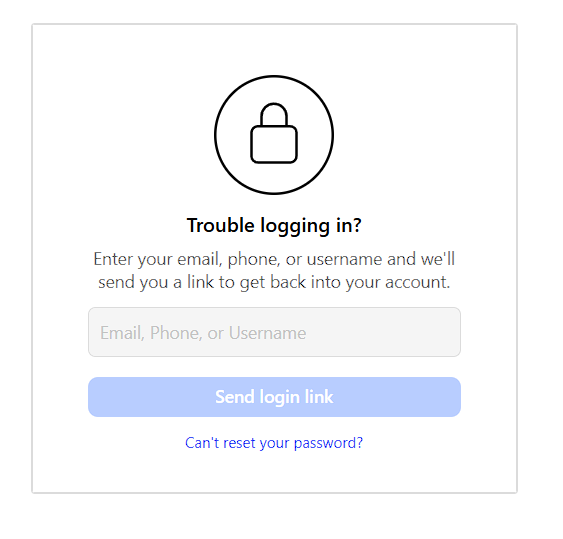
If you still remember your Instagram username, follow these steps:
- Go to instagram.com/password/reset.
- Enter your username instead of an email or phone number.
- Click Send Login Link.
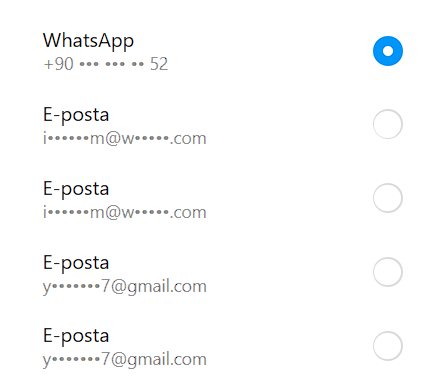
- Instagram will show a hint of the linked email (first and last letter) — this can help you recall which address you used.
- Open that email and follow the link to reset your password.
Tip: If you can’t remember your username, ask a friend to visit your profile — your username appears in the top bar of your account.
Step 2: What If Your Phone Number Changed?
If your registered phone number is no longer active, you can’t receive the SMS reset code. Here’s what to do:
- On the login page, tap Forgot password?
- Choose Need more help?
- Select “I don’t have access to this phone number or email.”
- Fill out the recovery form. You’ll need to provide:
- Your Instagram username
- Old email or phone number (if known)
- A new contact email address
Sometimes Instagram will ask for ID verification (driver’s license, passport, etc.) to prove ownership. This method is recommended by official sources like Meta Support and verified help pages.
Step 3: Forgot the Email Linked to Your Account?
No worries — there are still options:
- Try entering your username on the password reset page.
Instagram shows the masked version of the email (e.g., “m****@g****.com”). - Try to regain access to possible old emails (Gmail, Outlook, Yahoo, etc.) via their recovery pages.
- Once you regain access, return to Instagram and reset your password using that email.
If you can’t recover the email, proceed to the Support Request Form — Instagram can contact you via a new email if you verify your identity.
Step 4: Contact Instagram Support (Last Resort)
When all else fails:
- Visit Instagram Account Recovery Form.
- Fill in the requested fields accurately.
- Attach an official photo ID if asked.
Responses usually take 3 – 7 business days, depending on workload. Be patient and check your inbox (and spam folder) for updates from Instagram’s security team.
Advanced Security & Prevention Tips
Once you regain access, keep your account safe with these expert-level strategies:
1. Enable Two-Factor Authentication (2FA)
- Go to Settings > Security > Two-Factor Authentication.
- Prefer an authenticator app (like Google Authenticator or Authy) instead of SMS for stronger protection.
2. Keep Contact Info Updated
Always ensure your email and phone number are active and belong to you. Outdated info is the #1 reason people lose access.
3. Create a Strong, Memorable Password
Use at least 12 characters — mix uppercase, lowercase, numbers, and symbols. Avoid using your name or birthdate.
4. Use a Password Manager
Tools like 1Password, Bitwarden, or LastPass securely store your passwords and autofill them when needed.
5. Regularly Check Login Activity
Under Settings > Security > Login Activity, see where your account is logged in. Log out of unknown devices immediately.
Beware of Scams
Be extra cautious:
- Instagram will never ask for your password via email or DM.
- Only trust messages from @instagram.com domains.
- Ignore links from unknown senders claiming to “recover your account.”
Conclusion
If you’re thinking, “I forgot my Instagram password, don’t know my email, and my phone number has changed,” — take a deep breath.
Recovery is absolutely possible in 2025 thanks to improved Meta Support systems and ID verification tools.
Just follow these steps carefully:
- Reset via username
- Use “Need more help?” recovery forms
- Verify your identity if required
Once you regain access, secure your account for the future — enable 2FA, update contact info, and store passwords safely.